Your domain name is one of your business’s most valuable digital assets. It connects your website, email, landing pages, customer portals, marketing campaigns, and online brand identity. But every year, businesses lose domains for one simple reason: they forget to renew them.
A missed domain renewal can cause website downtime, broken email, lost leads, SEO disruption, customer confusion, and even brand misuse if someone else registers the domain after it expires.
That is why domain renewal management matters.
If you are wondering how to avoid losing your domain, the answer is not just “turn on auto-renewal.” A proper renewal system includes updated payment details, expiry alerts, secure registrar access, ownership documentation, and regular domain portfolio reviews.
In 2026, businesses are registering more domain variations, country-code domains, branded extensions, and defensive domains to protect their online presence. That makes renewal hygiene more important than ever.
This guide covers practical domain renewal tips, how domain expiration works, how to create a reliable domain auto-renewal setup, and how HasheDomains helps businesses keep their domains active, organized, and protected.
What Is Domain Renewal?
Domain renewal is the process of extending your domain registration before it expires.
When you register a domain, you are securing the right to use it for a specific period, usually one or more years. If you want to keep using that domain for your website, business email, or brand identity, you must renew it before the registration period ends.
If a domain expires, your website may stop working, your email may fail, and your domain may eventually become available for someone else to register.
For a business, that is not just a technical issue. It is a brand protection issue.
Why Domain Renewal Matters for Businesses
A domain is more than a web address. It is connected to many parts of your business.
Your domain supports:
- Your website
- Business email
- SEO performance
- Paid ads
- Landing pages
- Customer portals
- Online reputation
- Brand credibility
- Social media links
- Marketing campaigns
If your domain expires, all of these can be affected.
Website Downtime
If your domain expires, visitors may not be able to access your website. Instead, they may see an error page, an expired domain notice, or a parked page.
Even a short outage can hurt customer trust.
Email Disruption
Business email depends on your domain. If your domain expires, emails like sales@yourbrand.com or support@yourbrand.com may stop working.
That can interrupt sales, customer support, invoices, password resets, and internal communication.
SEO Problems
Search engines need access to your website to crawl and understand your content. If your domain goes offline, your SEO visibility can suffer.
Expired domains can lead to:
- Failed crawls
- Broken backlinks
- Lost traffic
- Landing page errors
- Reduced customer trust
- Search result issues
This is why domain renewal should be part of every technical SEO checklist.
Brand Protection Risk
If you fail to renew a domain and it becomes available again, someone else may register it.
That person could use it for:
- A competing website
- Spam
- Phishing
- Resale at a high price
- Redirecting your old traffic
- Brand impersonation
For established businesses, losing a domain can become expensive and damaging.
What Happens When a Domain Expires?
Domain expiration can vary depending on the domain extension and registrar, but the process usually follows a few common stages.
| Stage | What Happens |
|---|---|
| Active registration | The domain works normally |
| Expiration date | Registration period ends |
| Grace period | You may still be able to renew |
| Redemption period | Recovery may be possible with extra fees |
| Pending delete | The domain is close to public release |
| Public availability | Someone else may register it |
The most important point is simple: do not rely on grace periods.
Grace periods are emergency recovery windows, not a renewal strategy. Fees, timing, and recovery options can vary. The safest approach is to renew important domains before they expire.
Common Reasons Businesses Lose Domains
Most domain losses are preventable. They usually happen because of weak processes.
1. Expired Payment Card
Auto-renewal may be enabled, but if the saved credit card has expired, been canceled, or blocked, the renewal can fail.
2. Renewal Emails Go to the Wrong Person
Many domains are registered with an old email address, a former employee’s email, or a freelancer’s email. If renewal notices go there, the business may never see them.
3. Auto-Renewal Is Turned Off
Some businesses forget to enable auto-renewal. Others disable it to avoid charges and forget to renew manually.
4. Domains Are Spread Across Different Registrars
If your domains are registered across multiple platforms, tracking renewals becomes harder.
You may have different:
- Login details
- Expiry dates
- Payment methods
- DNS settings
- Renewal notices
- Security settings
5. No Clear Owner
In many businesses, no one knows who is responsible for domain renewals. Marketing assumes IT handles it. IT assumes leadership handles it. Finance only sees the bill.
This confusion can lead to accidental expiration.
6. Old Domains Are Forgotten
Legacy domains can still matter. Old campaign domains, previous brand names, redirect domains, and product domains may still have traffic, backlinks, or brand protection value.
Do not let an old domain expire without reviewing its purpose.
Domain Renewal Tips to Avoid Losing Your Domain
Follow these domain renewal tips to protect your business from accidental domain loss.
1. Enable Auto-Renewal
Auto-renewal is your first layer of protection.
Turn it on for:
- Main business domains
- Email domains
- Product domains
- Customer portal domains
- Campaign domains
- Defensive brand domains
- Country-code domains
- Domains with SEO value
Auto-renewal is not perfect, but it greatly reduces risk.
2. Keep Billing Details Updated
Review your payment method regularly.
Check:
- Card expiry date
- Billing address
- Backup payment method
- Company card status
- Bank restrictions
- Failed payment alerts
A domain auto-renewal setup is only useful if the payment method works.
3. Use a Shared Business Email
Do not rely on one person’s email address for domain renewal notices.
Use a shared inbox such as:
- domains@yourbrand.com
- admin@yourbrand.com
- it@yourbrand.com
- webmaster@yourbrand.com
Make sure multiple responsible people receive these alerts.
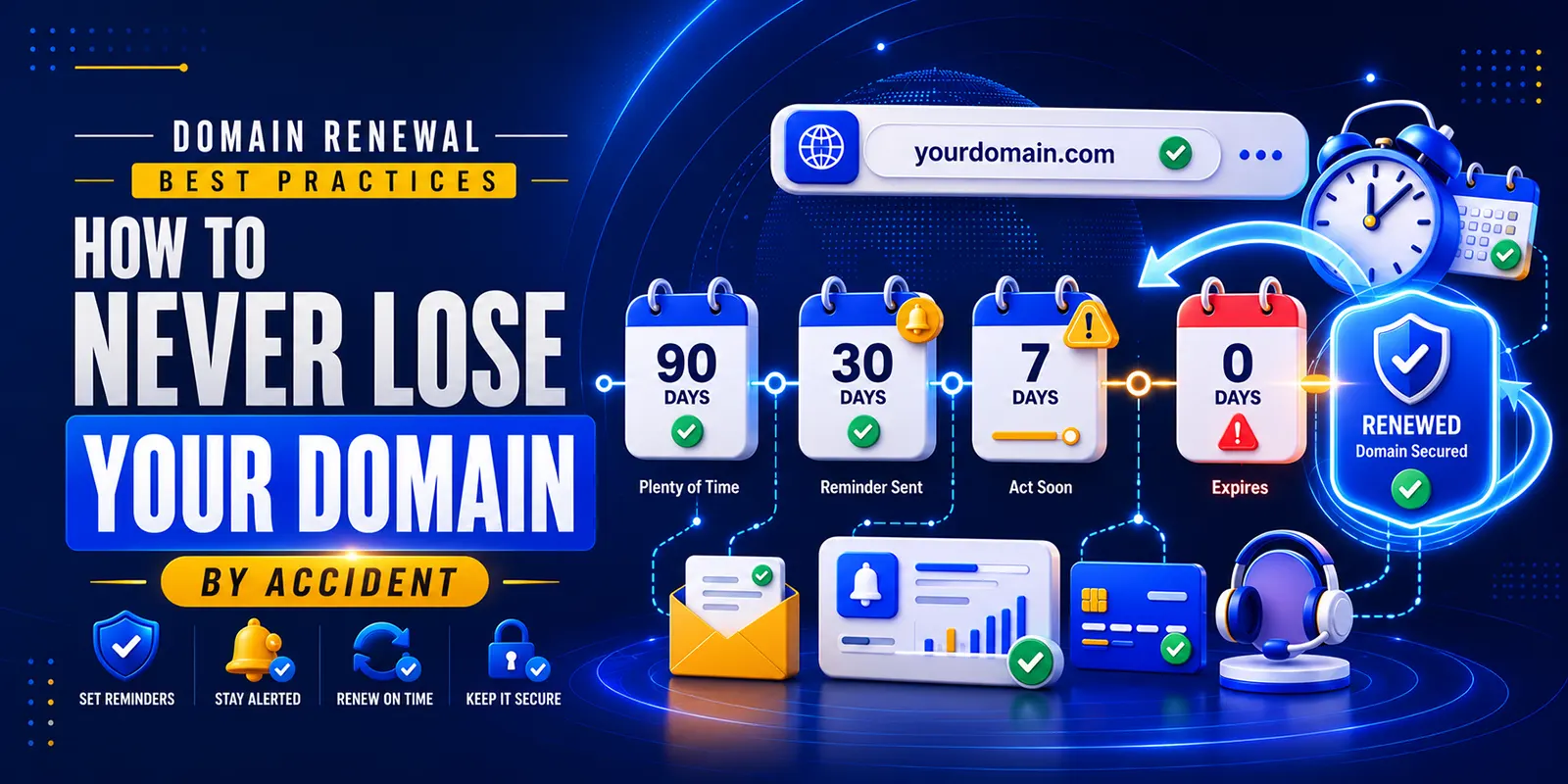
4. Add Calendar Reminders
Registrar emails are helpful, but they should not be your only reminder.
Set internal reminders:
- 90 days before expiry
- 60 days before expiry
- 30 days before expiry
- 7 days before expiry
For important domains, notify both technical and business owners.
5. Renew Critical Domains Early
Do not wait until the last day.
Renew important domains at least 30–60 days before expiration. For business-critical domains, consider multi-year registration.
Early renewal helps avoid last-minute problems with payment, access, staff availability, or approval delays.
6. Keep Registrar Access Secure
Make sure your business controls the domain registrar account.
Avoid situations where the domain is controlled by:
- A former employee
- A freelancer
- A web agency
- A personal email account
- An old admin account
Use strong passwords, secure recovery options, and two-factor authentication where available.
7. Create a Domain Inventory
A domain inventory helps you track every domain your business owns.
Include:
| Field | Details to Track |
|---|---|
| Domain name | Full domain |
| Registrar | Where it is registered |
| Expiry date | Renewal deadline |
| Auto-renewal | On or off |
| Payment owner | Who manages billing |
| DNS provider | Where DNS is controlled |
| Purpose | Website, email, redirect, campaign |
| Importance | Critical, important, optional |
| Owner | Responsible person or team |
This simple document can prevent expensive mistakes.
Domain Auto-Renewal Setup Checklist
A strong domain auto-renewal setup should include more than switching auto-renewal on.
Use this checklist:
- Log in to your registrar account.
- Review all active domains.
- Turn on auto-renewal for important domains.
- Confirm the saved payment method works.
- Add a backup payment method if possible.
- Check the renewal email address.
- Add reminders to your calendar.
- Review renewal pricing.
- Confirm registrar account access.
- Enable two-factor authentication.
- Document the domain in your inventory.
- Review the setup every quarter.
This process helps you avoid losing your domain because of simple administrative mistakes.
How to Manage Renewals for Multiple Domains
If your business owns several domains, renewal management becomes more important.
You may own:
- Main brand domain
- .com version
- .net or .co variations
- Country-code domains
- Misspelled versions
- Product domains
- Campaign domains
- Old brand domains
- Redirect domains
Not every domain has the same value, so organize them by priority.
| Category | Examples | Renewal Action |
|---|---|---|
| Critical | Main website, email domain, customer portal | Auto-renew, renew early, monitor closely |
| Important | Product domains, redirects, country domains | Auto-renew and review quarterly |
| Optional | Old ideas, unused campaigns | Review before renewal |
Before letting any domain expire, ask:
- Does it receive traffic?
- Does it have backlinks?
- Is it used for email?
- Is it used in ads?
- Does it redirect to the main website?
- Could someone misuse it?
- Is it connected to a trademark or brand name?
If the answer is yes, renew it or review it carefully before dropping it.
Why Grace Periods Are Not Enough
Some business owners assume they can renew a domain after it expires. Sometimes that is true, but it is risky.
Grace periods can vary by domain extension and registrar. During this time, your website or email may stop working. If the domain moves into a later recovery stage, extra fees may apply.
If you wait too long, the domain may be deleted and released to the public.
A safer rule is:
Renew important domains before they expire. Never depend on recovery periods.
Domain Renewal and SEO
Domain renewal is often overlooked in SEO planning, but it directly affects website availability.
If a domain expires, search engines and users may not be able to access your content. This can affect crawling, indexing, backlinks, traffic, and branded search visibility.
Before major SEO or marketing work, check domain renewal status.
Review renewals before:
- Website migrations
- Product launches
- Paid ad campaigns
- Email campaigns
- PR campaigns
- Seasonal promotions
- Rebrands
- International expansion
Your SEO strategy depends on a stable, active domain.
Domain Renewal and Email Protection
Your domain controls business email. If the domain expires, your email may stop working even if your email platform is active.
This can affect:
- Sales inquiries
- Customer support
- Invoices
- Password resets
- Vendor communication
- Internal messages
- Marketing emails
Your domain also supports DNS records used for email authentication, such as SPF, DKIM, and DMARC.
That means domain renewal is also part of email deliverability and business continuity.
How HasheDomains Helps With Domain Renewal Management
HasheDomains helps businesses, startups, entrepreneurs, and individuals register, transfer, renew, and manage domains in one place.
For businesses that want better renewal control, HasheDomains supports important domain management needs such as:
- Domain registration
- Domain transfer
- Renewal management
- DNS management
- WHOIS privacy
- Secure domain control
- Easy domain search
- Competitive pricing
Managing domains through a reliable platform helps reduce confusion, especially when your business owns multiple domains or brand variations.
With HasheDomains, businesses can keep domain ownership, renewal settings, privacy options, and DNS controls easier to manage from one place.
Domain Renewal Checklist
Use this simple checklist to protect your domains.
Monthly
- Check critical domains.
- Review upcoming expirations.
- Confirm the website and email are working.
- Look for failed payment alerts.
Quarterly
- Review domains expiring in the next 90 days.
- Confirm auto-renewal status.
- Update billing details.
- Check registrar access.
- Review DNS settings.
- Remove access for former employees.
Annually
- Audit the full domain portfolio.
- Renew critical domains early.
- Review unused domains.
- Check brand protection gaps.
- Transfer scattered domains if needed.
- Update the domain inventory.
- Review WHOIS privacy and security settings.
Quick Answer: How Do I Avoid Losing My Domain?
To avoid losing your domain, enable auto-renewal, keep your payment method updated, use a shared business email for renewal alerts, set calendar reminders, renew critical domains early, secure registrar access, and review your domain portfolio regularly. Do not rely on grace periods as your main renewal strategy.
Frequently Asked Questions
What are the best domain renewal tips?
The best domain renewal tips are to enable auto-renewal, keep billing details updated, use a shared business email for alerts, renew important domains early, document all domains, and review your domain portfolio regularly.
How do I avoid losing my domain?
You can avoid losing your domain by setting up auto-renewal, keeping payment details current, using multiple renewal alerts, securing registrar access, and auditing your domains before they expire.
What is a domain auto-renewal setup?
Domain auto-renewal setup means configuring your registrar account so your domain renews automatically before expiration. A good setup also includes valid billing information, renewal alerts, backup contacts, and calendar reminders.
Should I turn on auto-renewal for every domain?
Turn on auto-renewal for every domain that supports your website, email, SEO, redirects, customer access, campaigns, or brand protection. For unused domains, review their value before deciding.
What happens if my domain expires?
If your domain expires, your website and email may stop working. You may still be able to renew it during a grace or redemption period, but recovery options and fees can vary.
Can I recover an expired domain?
Sometimes, yes. Recovery depends on the domain extension, registrar, timing, and domain status. If the domain has already been released publicly, someone else may register it.
How often should I audit my domain portfolio?
Review critical domains monthly, upcoming renewals quarterly, and your full domain portfolio at least once per year.
Why do businesses lose domains by accident?
Businesses often lose domains because of expired payment cards, missed renewal emails, disabled auto-renewal, poor documentation, former employees controlling accounts, or unclear responsibility.
Conclusion
Your domain name is too important to risk.
A missed renewal can break your website, stop your business email, hurt SEO, disrupt marketing campaigns, confuse customers, and expose your brand to unnecessary risk.
The good news is that most domain renewal problems are easy to prevent. Enable auto-renewal, keep billing details updated, set multiple alerts, use a shared business email, document your domains, and review your portfolio regularly.
If you want to know how to avoid losing your domain, the best answer is to build a simple renewal system before there is a problem.
HasheDomains makes it easier to search, register, transfer, renew, and manage domains with DNS controls, WHOIS privacy, and secure domain management tools.
Protect your domain before it expires. Review your renewal settings today and keep your online brand identity safe.